
Overview
Coverage Smart Tags are out-of-the-box smart tags available for all coverage types enabled on your instance. These tags allow you to display individual coverage details in your forms, giving you full control over how coverage information is presented to your clients. Instead of using the default Policy Coverage Details table tag, which displays all coverage information in a standardized table format, you can use individual coverage smart tags to create custom layouts that match your specific requirements.To learn more about smart tags, see here.
How Coverage Smart Tags Work
To see more details about how this function works, watch the video below.
Each coverage smart tag populates with the corresponding coverage-level value from your policy. These tags pull coverage-level values only—any exposure-specific endorsement values on the coverage are not included.

$100,000 and a per-claim limit of $1,000,000, the smart tags will display these coverage-level values, regardless of any insured-specific or exposure-specific values that may exist.
Available Coverage Smart Tags
Coverage smart tags are automatically available for all coverage types in your instance. The tag name follows the pattern: @Coverage Name Field Name.Coverage Property Tags
These tags display the core coverage details:-
Coverage Name Deductible / Coverage Name Retention: Displays the deductible or retention amount for the coverage. The label (Deductible or Retention) matches your instance configuration. Some customers track this value as Retention and some as Deductible, so the smart tag label will align with your specific configuration.
Example:
@Commercial Property Retentiondisplays$100,000 -
Coverage Name Retroactive Date: Displays the retroactive date for the coverage.
Example:
@Commercial Property Retroactive Datedisplays11/18/2025 - Coverage Name Prior/Pending Litigation Date: Displays the prior/pending litigation date, if tracked for the coverage. Most customers do not choose to track this on the coverage.
-
Coverage Name Limit Name: Displays the coverage-level limit value for each limit available on the coverage. A separate tag exists for each limit type (Per Claim, Aggregate, etc.).
Examples:
@Commercial Property Per Claimdisplays$1,000,000@Commercial Property Aggregatedisplays$2,000,000
Coverage Financial Tags
-
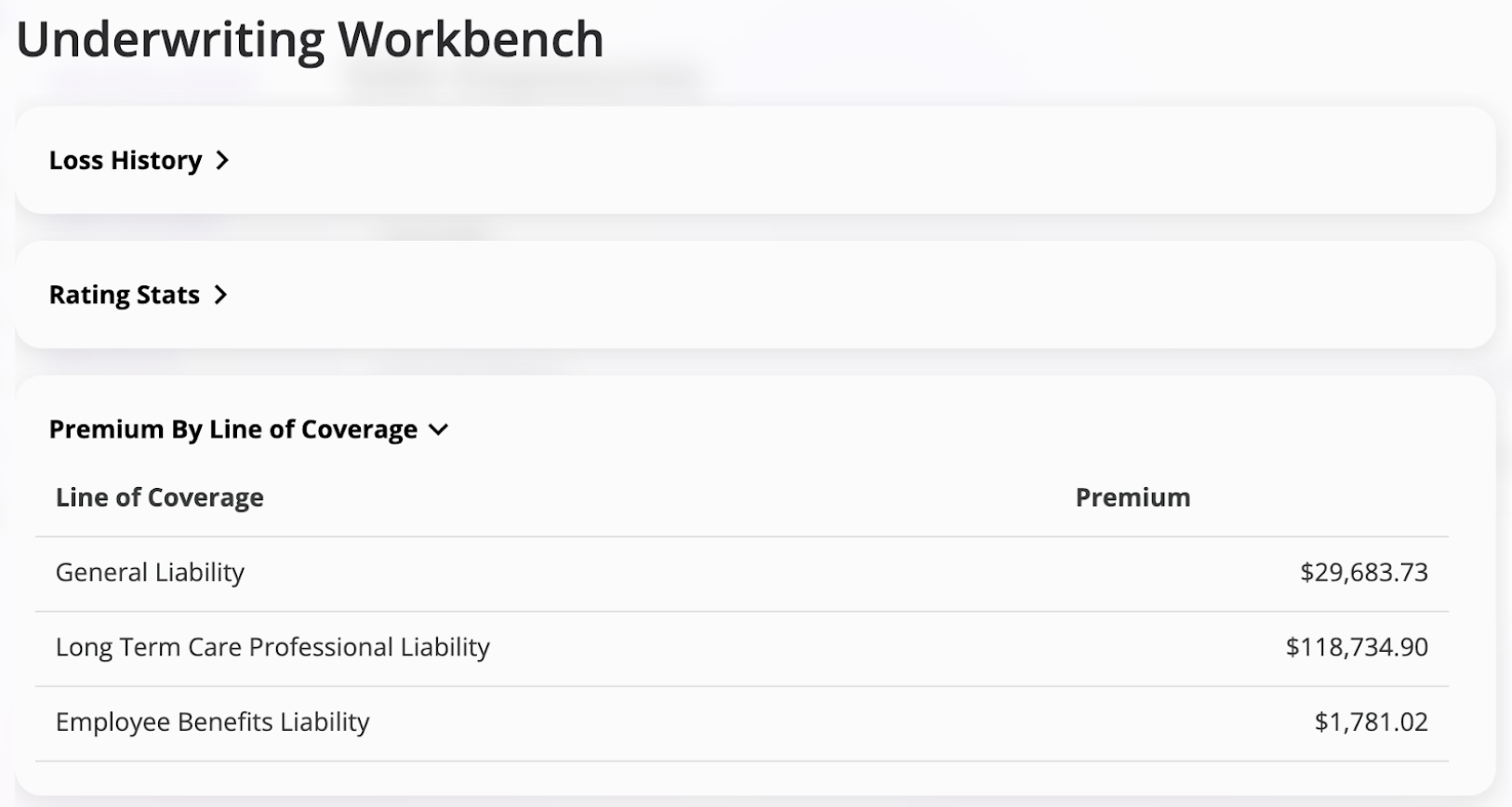
Coverage Name Premium: Displays the amount of premium attributable to that line of coverage. In the Premium By Line of Coverage card, you can see that General Liability coverage is responsible for $29,683.73 of premium, so the tag titled “General Liability Premium” would display that amount.
Example:
@General Liability Premiumdisplays$29,683.73 - Coverage Name Premium Tax: Displays the amount of tax attributable to the coverage premium value. See How Is Coverage Tax Calculated for more specific details on how this smart tag resolves its value. This value isn’t displayed in the typical quote workflow.
- Coverage Name Premium + Tax: Displays the sum of the coverage premium and coverage tax. This tag determines coverage premium and coverage tax in the same way as the two tags listed above and simply returns the sum of those amounts. This value isn’t displayed in the typical quote workflow.
How Is Coverage Tax Calculated
The tax is determined by the rating engine associated with your instance. Some customers calculate this at the exposure-level, others track it at the overall policy-level. This tag handles both scenarios. In some cases, premium is broken down by coverage but the tax amount is not. This tag is also able to handle this case by attributing to the coverage the same percentage of overall tax as the coverage has of overall premium. Example: A policy has a total premium of$100,000 of which General Liability is $12,000 and overall tax is $10,000. In this case, General Liability is 12% of overall premium, so the General Liability Premium Tax tag would return 12% of the $10,000 overall tax amount, which is $1,200.