
Overview
AI Insurance supports OFAC screening for insureds classified asPerson or Company. Screening can occur when you create an insured, during the quote flow, and can be re-run during endorsements or renewals.
OFAC screening is only triggered for insureds with entity type
Person or Company.Create a New Insured (Exposures)
- Go to Insureds → Create New Insured.
- Fill in the insured information.
- Set Entity Type to
PersonorCompanyto enable OFAC screening. - Review the screening results:
- If a potential match appears, you can choose:
- Confirm: acknowledge the match applies to this insured; follow your internal procedures.
- Decline: the match does not apply to this insured. Declining all matches marks the screening as passed.
- If a potential match appears, you can choose:
- Use Rerun OFAC Verification any time to refresh results.
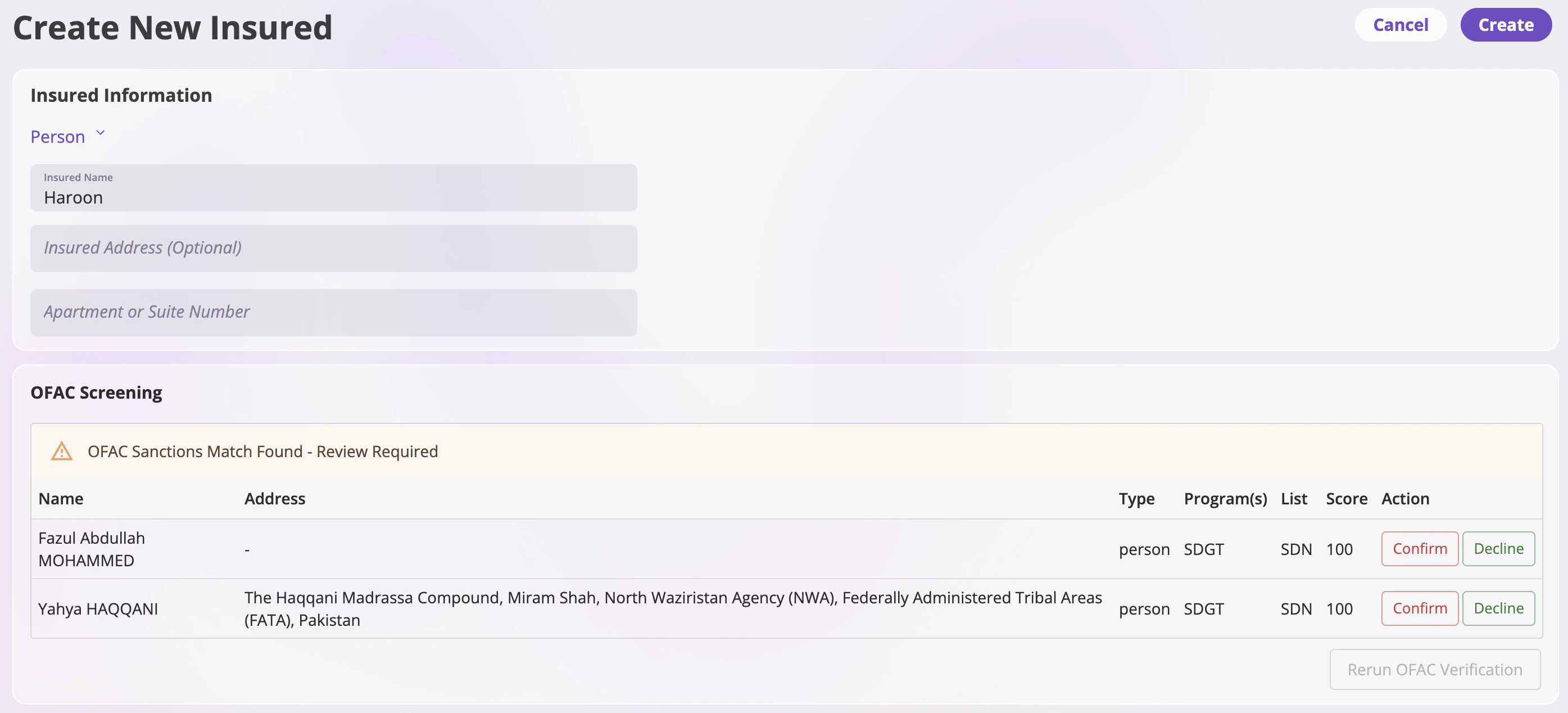
The OFAC sanctions list changes over time. An insured who previously passed can appear on a subsequent screening, and vice versa.
Quote Flow (Submissions)
You can also screen during quoting:- Start a new submission → Create a Submission.
- In the Edit Insured step, if the insured is a
PersonorCompany, the OFAC check is available. - Confirm/Decline potential matches as needed, or rerun the verification.
Endorsements and Renewals Policy
- Endorsements: When you Endorse a Policy, the system does not automatically re-screen previously screened insureds. You can manually Rerun OFAC Verification if you need an updated check.
- Renewals: Same behavior as endorsements—no automatic re-screen, but you can rerun the verification if required.